Goods-to-Person Systems: How to Choose One (and When It Pays Off)

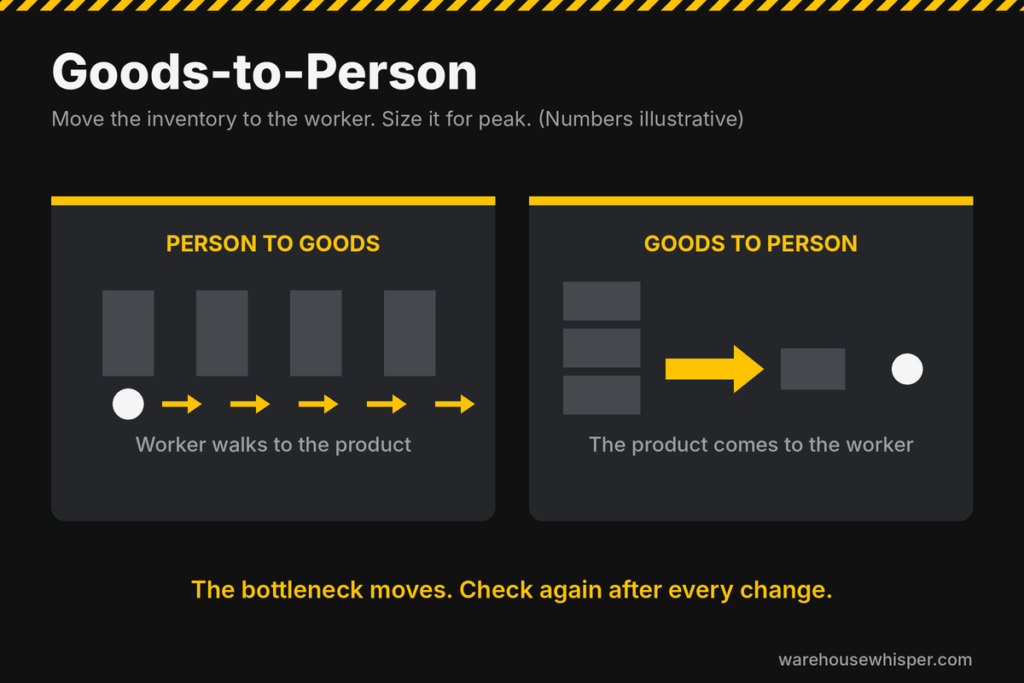
Goods-to-person systems bring the inventory to a stationary worker instead of sending the worker to the inventory. When the fit is right, they cut the walking out of picking. When the fit is wrong, they are an expensive way to move your bottleneck.
This guide explains how a goods-to-person system works, the main technology types, when one pays off, how to size one from your own order data, and what to settle before you talk to a vendor.
What a goods-to-person system does
In a traditional warehouse, pickers travel to the product. That is person-to-goods picking, and travel is a large part of the day. Goods-to-person (GTP) reverses it. Storage equipment such as robots, shuttles, or carriers delivers totes, bins, or shelves to a pick station. The worker picks from the container in front of them and puts the item into an order container.
The gain is less walking, steadier pick rates, and tighter control of inventory. The cost is capital, software integration, and a building that now depends on the system running.
Walking is often cited as roughly half of a picker’s day, but that is a rule of thumb. Measure yours before you believe anyone’s number, including mine.
The main types of goods-to-person systems
Vendors use different names, but most systems fall into four groups. Example vendors are listed so you know what category you are looking at. This is not a ranking.
| Type | How it works | Where it fits | Watch out for |
|---|---|---|---|
| Cube storage with grid robots | Bins stack in a dense grid. Robots run on top of the grid and bring bins to ports. Example: AutoStore. | Small items, high SKU counts, tight floor space | The ports limit throughput. Very fast movers can be a poor fit. |
| Shuttle AS/RS | Shuttles travel in racking aisles and deliver totes or cartons to stations by lift and conveyor. Examples: Dematic Multishuttle, Knapp OSR, SSI Schaefer Cuby, Vanderlande ADAPTO. | High volume, steady demand, tote or carton handling | Fixed infrastructure. Expansion and layout changes are harder. |
| Robots that move shelves or racks | Mobile robots carry whole shelving units to pick stations. Example: Swisslog CarryPick. | Flexible layouts, growth in steps, existing buildings | Floor space and robot traffic as the fleet grows |
| Aisle-based robots | Robots travel within aisles and deliver directly to the pick point. Example: OPEX Perfect Pick. | High-speed picking of tote-sized items | Aisle layout is hard to change after install |
Mobile robots (AMRs) that assist pickers without bringing the inventory to them are a different category. See AMR companies for that. Pick-to-light is also a different approach, and it is often compared with GTP.
When goods-to-person pays off, and when it does not
The fit depends on your order profile, not your industry.
It tends to pay off when you have:
- Many SKUs of small to medium size, with a lot of picks per square foot
- High order lines per day, and enough volume to keep the stations busy
- Labor that is expensive, hard to hire, or both
- Tight space, so storage density matters
- A peak that makes manual picking expensive to staff
It tends not to pay off when you have:
- Low volume, so the stations sit idle
- Large, heavy, or irregular items that do not fit the containers
- Mostly pallet or case picks
- A small number of SKUs, where a simple layout and good slotting already work
- Data you do not trust, such as bad item dimensions or location records
Many buildings that think they need GTP have a slotting, replenishment, or work-release problem instead. Fix those first. See SKU slotting.
How to size a goods-to-person system: a worked example
These numbers are illustrative. Real station rates depend on the technology and on your order profile, so get them from the vendor against your data.
Say a peak shift handles 12,000 order lines in 8 hours.
- Demand: 12,000 ÷ 8 = 1,500 lines per hour
- Assume a GTP station picks 400 lines per hour
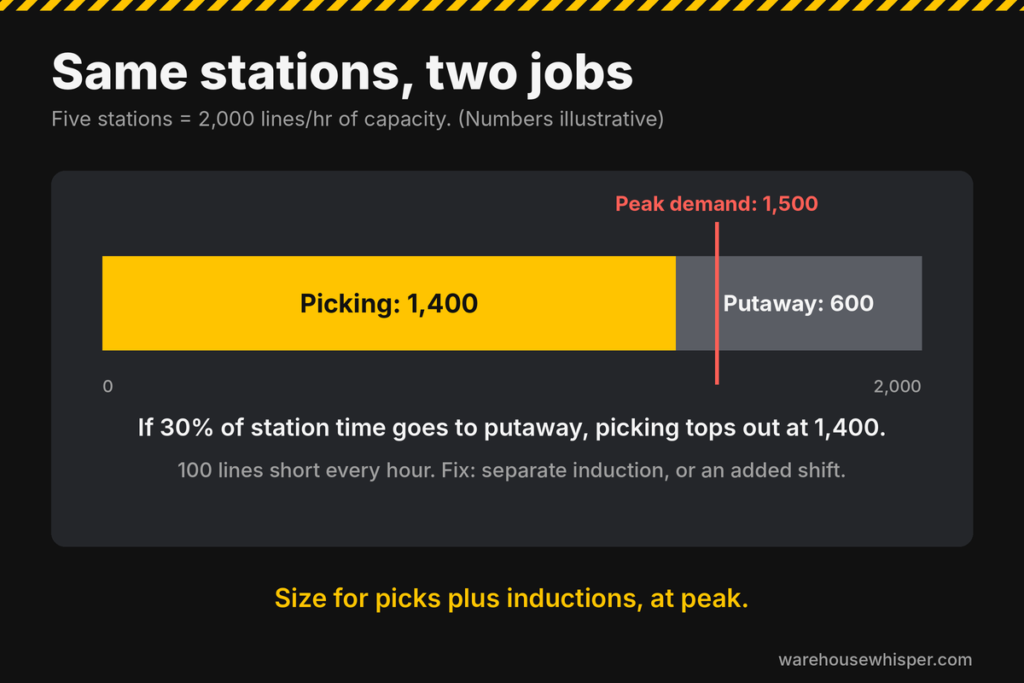
- Stations needed: 1,500 ÷ 400 = 3.75, which rounds up to 4. Four stations give 1,600 lines per hour, only about 7% above demand and no room for downtime or a stronger peak. Plan for 5 stations, which gives 2,000.
- Then add the inbound side. Every tote you put into the system uses port or station capacity too. If replenishment shares the same stations as picking, size for picks plus inductions at peak, not picks alone. Otherwise the system meets the pick rate on paper, and you need an extra shift to keep it stocked.
- Manual comparison: at 90 lines per hour per picker, 1,500 ÷ 90 = 16.7, so about 17 pickers.
- Labor effect: 5 station operators instead of 17 pickers is about 12 fewer people on that shift. Count the support roles you add, such as inventory handlers, maintenance, and replenishment.
Two checks that people skip:
- Size storage and throughput separately. A system can hold your inventory and still not move enough per hour, or the reverse.
- Design for peak, not the average. The average day is where the system looks great. The peak hour is where it fails.
For payback, use simple math first:
Payback = installed cost ÷ annual net savings
Net savings means labor saved, minus maintenance, software, energy, and any added support staff. Labor only counts as saved if hours actually come out of the schedule.
What to settle before you talk to vendors
Get this together first, so vendors answer your building and not a brochure:
- 12 months of order lines, by day and by hour, including your peak weeks
- An item master with real dimensions and weights
- Inventory by SKU and velocity, so you know which items move the building
- Orders per day, lines per order, and units per line
- Your growth plan for the next three to five years
- Building limits: height, floor flatness, fire code, and where the system would go
- WMS and control integration: who owns it, and who pays for it
- Whether putaway and picking share ports or stations, and what the combined throughput is at your peak
Then ask vendors for:
- Throughput guaranteed against your order profile, not a catalog rate
- What happens when the system is down, and how you keep shipping
- Reference sites with an order profile like yours that you can call
- Real timelines from contract to go-live, and who staffs maintenance after
- Total cost of ownership, including software, spares, and service
Where goods-to-person projects go wrong
- Buying for the average day. Peak sets the size, and peak is where systems struggle.
- Moving the bottleneck. A GTP system speeds up picking, and then packing, induction, replenishment, or shipping becomes the new limit. Read how to find a warehouse bottleneck before you sign.
- Bad data in, bad system out. Wrong dimensions and wrong velocity put the wrong items in the wrong containers.
- No plan for downtime. If a single failure can stop the building, you need a fallback.
- Underestimating software. Integration with the WMS or WES is where schedules slip.
- Counting savings that never happen. If the schedule does not change, the labor savings do not exist.
What I see on the floor
When you plan a goods-to-person system, size the way product goes in as carefully as the way it comes out. In many designs, putaway and picking use the same ports or stations. Every tote you replenish takes a slot that a pick could have used.
On paper, the system meets your pick rate. On the floor, receiving, replenishment, and picking compete for the same stations, so you end up replenishing on a second shift, or you stop picking to keep stock flowing. If both transactions happen at the same place, you may need an additional shift, and that cost never shows up in the vendor’s labor savings.
Track the right numbers once it is running
A GTP system needs a scoreboard like any other process. Start with the warehouse KPIs that fit: lines per hour per station, station utilization, order cycle time, picking accuracy, and system availability.
Not sure whether goods-to-person is the right move?
That is what the one-week operations review is for. You send four standard exports, I walk the floor, and in five days you get a ranked list of where your building loses time and money, and what to fix first. It tells you whether automation is the answer or the next problem.
Goods-to-person FAQ
What is a goods-to-person system?
A goods-to-person system uses robots, shuttles, or other automated storage equipment to deliver inventory to a pick station, so workers pick without walking to the product.
What is the difference between goods-to-person and person-to-goods?
In person-to-goods picking, the worker travels to the product. In goods-to-person, the product travels to the worker. Goods-to-person cuts walking time but adds capital cost and system dependence.
How much does a goods-to-person system cost?
Cost varies widely with the technology, the size of the system, and the software integration. Do not use a generic number. Get quotes from several vendors against the same order data, and compare total cost of ownership, including software, maintenance, and spare parts.
How do I know if I need a goods-to-person system?
Check your order profile first. High lines per day, many small SKUs, tight space, and expensive or scarce labor point toward GTP. Low volume, large items, or a small SKU count usually do not. Rule out slotting, replenishment, and work-release problems before you spend on automation.
How long does it take to implement a goods-to-person system?
It takes months, not weeks, for most full systems, and fixed systems such as grids and shuttles take longer than mobile robot systems. Ask each vendor for timelines from contract to go-live at reference sites like yours.